

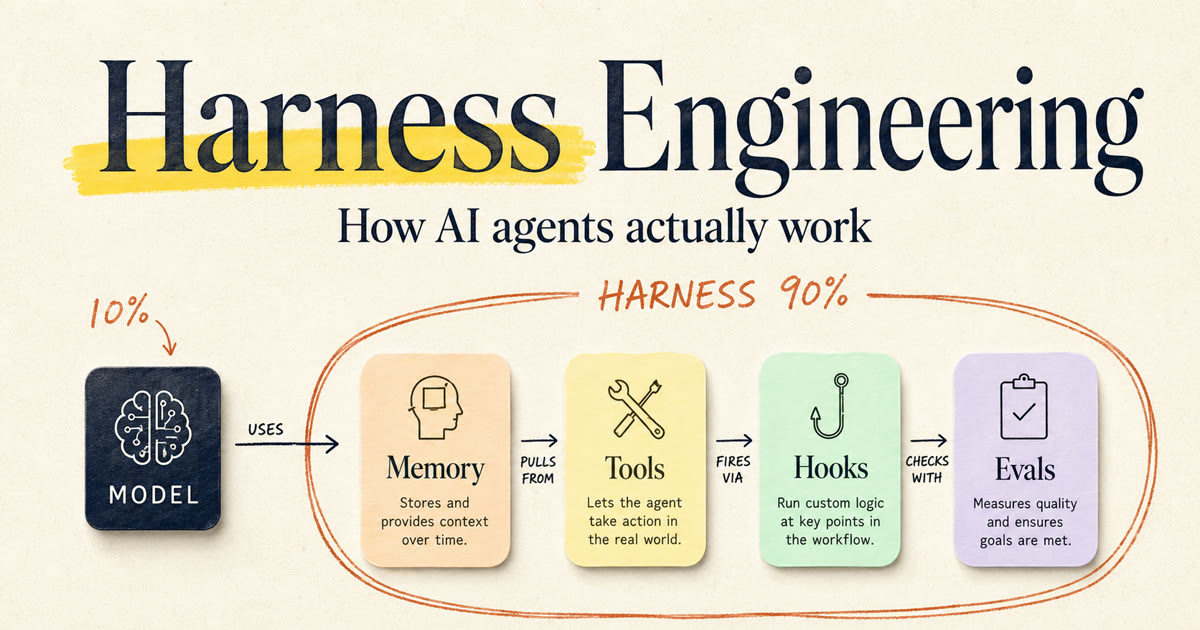
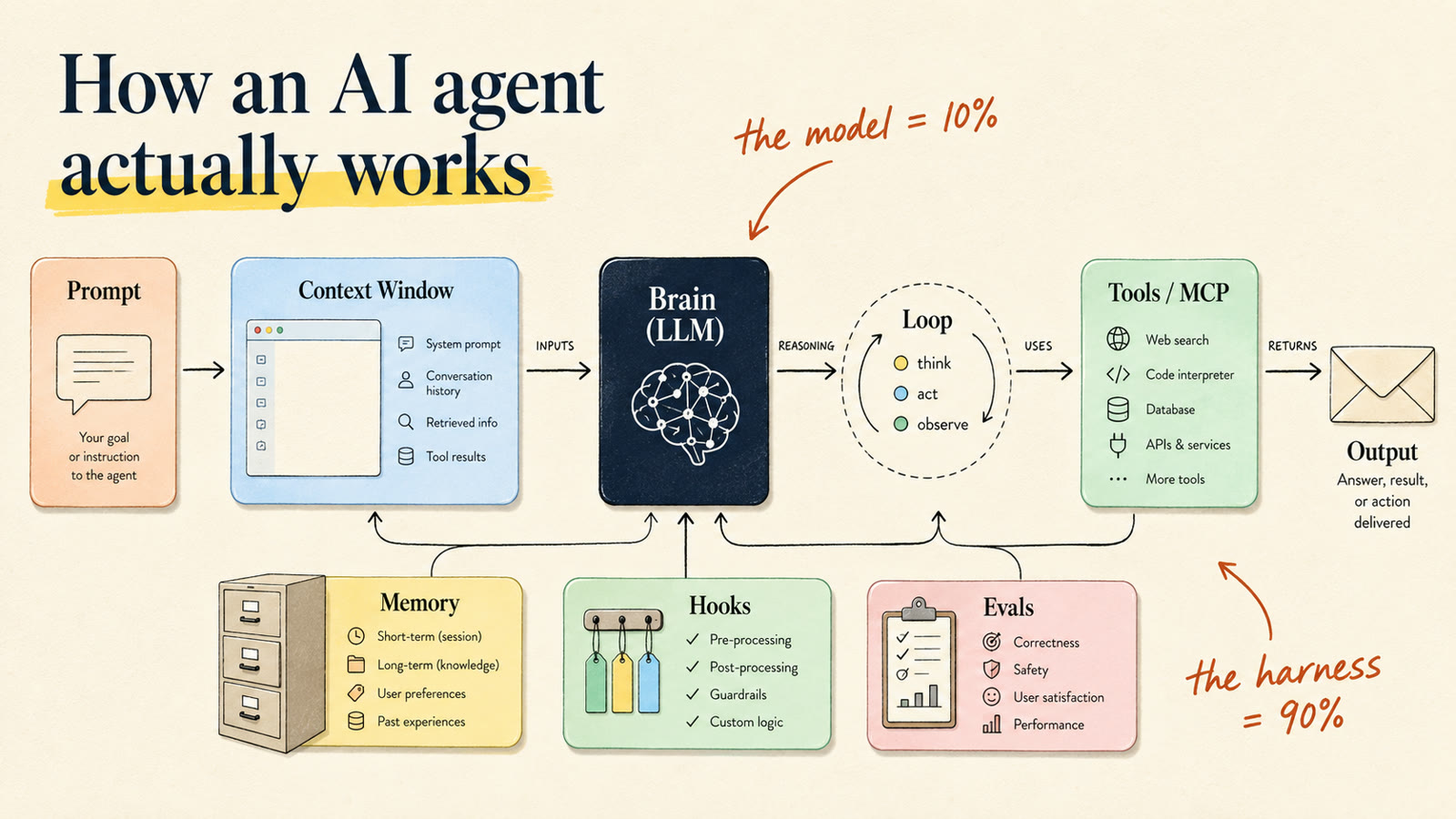
There is one diagram that explains how every AI agent works. The chatbot that forgot your name mid-conversation. The coding assistant that fixed a bug in your repo. The support bot that answered like it actually knew your docs. Same diagram underneath, and it comes down to one sentence: an agent is a model plus a harness. The model is the brain. The harness is everything around it that makes the brain useful. Most people obsess over the brain. This guide is about the other 90%.
I write deep-dives like this when a concept is worth actually understanding, not just nodding at. Want the next one?
What is harness engineering?
Harness engineering is building everything around a language model that turns raw intelligence into a working agent: the memory that survives between sessions, the retrieval that pulls the one fact that matters at the moment it matters, the tools that touch the real world, the rules that stop it from doing something dumb, the grading that tells you whether any of it is good.
A brain in a jar can think, but it can't do anything. It can't remember you, can't look anything up, can't pick up a tool. The harness is the body: the memory, the hands, the eyes, the notebook the brain writes in.
Most people assume the model is the whole show. It isn't. One team that put numbers on this puts the split at roughly 10% model, 90% harness. Rough estimate, not a measurement, but anyone who has built one of these will tell you it's about right. It's also why the Terminal-Bench leaderboard, which ranks agents on real terminal work, scores every entry as a pair: a harness plus a model. Same model, different harness, different score.
Picture a support agent handling a refund. The model writing the polite reply is the easy 10%. The 90% is knowing the order history, finding the refund policy, moving the money, and checking the money really moved. That's the real engineering.
I made a full hour-long walkthrough of this diagram. Watch it here or read on.
The brain and its five holes
Start in the middle. The model, the LLM. It reads a pile of text and predicts the next word, one token at a time (a token is roughly three-quarters of a word). It's a prediction machine that read most of the internet. Now the honest part: that brain has five holes, and every node in the harness exists to patch one.
- It knows the whole world and nothing about you. Your files, your customers, your pricing. Unless you're famous, you're not in there.
- It knows nothing about right now. Training stopped at a cutoff date. Last night's game, today's calendar: blank.
- It's stateless. You tell it your name, it answers, and that conversation is gone from its head. It only "remembers" because something quietly pastes the whole chat back in every turn.
- It's probabilistic. It's predicting, not looking things up, so it can be confidently, smoothly wrong. Ask for a court case citation and it can hand you a perfectly formatted case name, court, and year for a case that does not exist.
- It has no hands. It can't open a file, send an email, or touch the internet. It can write you a gorgeous email and then just sit there.
So picture a brilliant new hire with amnesia: genius, resets every morning, has never seen your stuff, can't open a single app. Useless alone. That's model vs harness in one image. The brain is the hire; the harness is everything that makes the hire employable.
The context window: RAM, not a hard drive
The first fix: give the brain something to look at. The context window is everything the model can see on a single turn: the system prompt that says who it is, the conversation so far, retrieved facts, tool results, all stacked into one block. The better name is working memory. It's the desk in front of you while you answer a support email: the refund policy, the customer thread, a sticky note saying stay polite. Anything not on the desk might as well not exist.
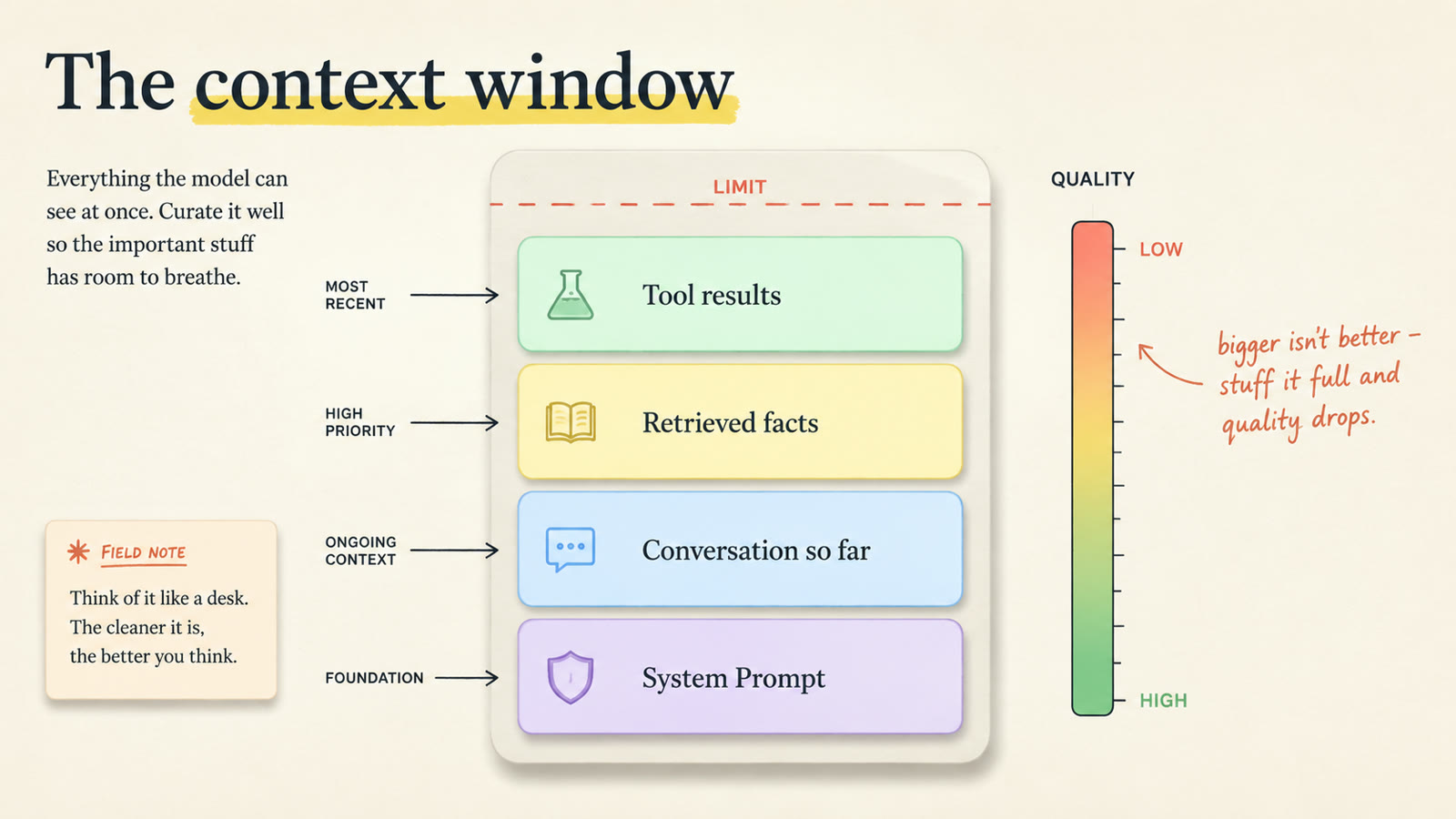
Most people assume the window is where the AI keeps its memory. It isn't. It's RAM, not a hard drive. Fast, small, wiped clean every turn. That's the real reason the chatbot "forgot" your name: it never held it. The harness re-pastes the whole conversation in every turn so the chat feels continuous. Stop pasting, and it's a stranger.
The window has a hard ceiling, from around a hundred thousand tokens up to over a million, which sets up the trap: shove everything in and quality drops. The field calls it context rot, and Chroma's research shows performance degrading as input grows, even on tasks a model handles easily when the input is short. The "Lost in the Middle" paper found models pay sharp attention to the start and end of a long context and sag in the middle, exactly where your one important sentence is buried. Paste a 40-page contract in and ask about the termination notice period, and a stuffed window is where the model skims past the answer. Hand it just that clause and it nails it every time. That's the core skill in Anthropic's Effective context engineering for AI agents: put in only what matters, this turn. Past a point, more is the problem.
Even with a good harness, a model can still make things up. The fixes that work today, with copy-paste prompts, are in how to stop AI hallucinations.
Memory: the conversation, the cabinet, and the three drawers
If the window gets wiped every turn, where does anything live?
Short-term memory is the running conversation, and it lives inside the window: the whole transcript gets re-fed every turn. Picture it literally: every time you speak, a fresh employee walks in, reads the full meeting log, answers your one question, then forgets everything and walks out. It feels like one person who's been there the whole meeting. It never was. And because the log grows and you pay tokens for every page, the harness compresses old turns into a running summary, which costs you: if the order number from turn six didn't make the summary, the agent can't pull up the order. The hard wall: close the tab, and all of it is gone.
Long-term memory fixes that. The window is RAM; long-term memory is the hard drive. Durable, stored in a database outside the window, pulled back in on demand. You don't spread your whole filing cabinet across your desk. You grab the one folder when the customer calls.
It comes in three types, the same three your own brain runs:
- Procedural: how to do things. Riding a bike. For an agent, a skill, a packaged how-to it loads when a task matches. More below.
- Semantic: facts. Paris is the capital of France, and you don't remember the Tuesday you learned it. For an agent: your name, your company, that you hate long emails. This is what makes it your agent instead of a generic one.
- Episodic: events, with a time attached. For an agent, the timestamped log: "last week this customer asked for a refund and we said no." You often query it by time and filter, not meaning: "the last ten conversations with this account."
I wrote a full guide on building a persistent, AI-maintained memory system if you want to go deep here. For now, hold the shape: three drawers, outside the window, waiting.
RAG: the open-book exam
The cabinet is full, and you can't pour it into the window; that's context rot with more fuel on it. Someone asks about the refund window on a damaged item, and the answer is one paragraph out of a 200-page handbook. The job is grabbing that paragraph and leaving the other 199 pages alone.
That's retrieval. The industry calls it RAG, retrieval-augmented generation, and you already know the pattern: it's an open-book exam. Nobody memorizes the textbook the night before. You read the question, then flip to the few pages that cover it. The model didn't memorize your documents. It looks them up, fresh, the second the question lands.
How does it know which pages to flip to? Embeddings. An embedding turns text into a long list of numbers that capture what it means. Picture a giant map of meaning: every sentence you own is a dot, and similar meanings sit close together. "King," "queen," and "monarch" crowd into one neighborhood; "banana" is across town. A question gets turned into numbers too, lands on the map, and the system grabs whatever sits nearby, even when none of the words match. Meaning, not spelling, measured as plain distance between dots. A vector database stores and searches those dots fast.
The pipeline: chunk your documents, embed each piece, store them, once, up front. Then per question: embed the question, find the nearest pieces, drop the top handful into the window. That's RAG. Two warnings: chunk size matters more than anyone expects (too big and everything looks vaguely relevant, too small and you slice a fact in half), and meaning-search isn't always right ("the last ten orders from this customer" wants an exact database query). Strong systems run both.
The punchline: ask a raw model about your internal docs and it invents a reasonable-sounding refund policy, and a reasonable-sounding wrong answer is the most dangerous kind. Hand it the actual page first and it reads from your policy instead of its imagination. But stay honest: RAG fetches what's relevant, not what's guaranteed true. Wrong page in, wrong answer out, with a straight face.
Skills: the binder with tabs
One drawer in the cabinet holds how-to, not facts. A skill is a packaged procedure: "here is exactly how we process a refund," written step by step so the agent does it the same way every time instead of improvising. It's the sheet you'd hand a new person on day one.
The problem: you want forty skills, and stuffing all forty into the window would drown it. The fix is the binder with tabs, what the field calls progressive disclosure. At startup the agent sees only the tab labels, a name and one line per skill. When a task matches a tab, it opens that one section and loads the full instructions. One agent carries dozens of skills and only pays for the tab it has open.
Zoom out and this is the biggest call in context engineering: static versus dynamic. Static is the stuff taped to your monitor, always loaded, billed on every turn, forever. Dynamic is the files in the cabinet, cheap until you pull them. Tape too little and the agent forgets who it is. Tape too much and there's no room left to think.
Skills also quietly changed a default. The old move was armies of specialist bots: one for refunds, one for reports. Now one generalist flexes into a specialist the moment a tab opens. Fewer moving parts, same range. Subagents still matter; we'll get to where they shine.
The loop: think, act, observe, repeat
Everything so far happens in one shot. You ask, it answers. That's a chatbot. Give it a real task and it hands you a beautiful plan, then sits there. What turns a thing that talks into a thing that works is the loop, the core pattern in Anthropic's Building Effective AI Agents: think, act, observe, repeat, until the job is actually done.
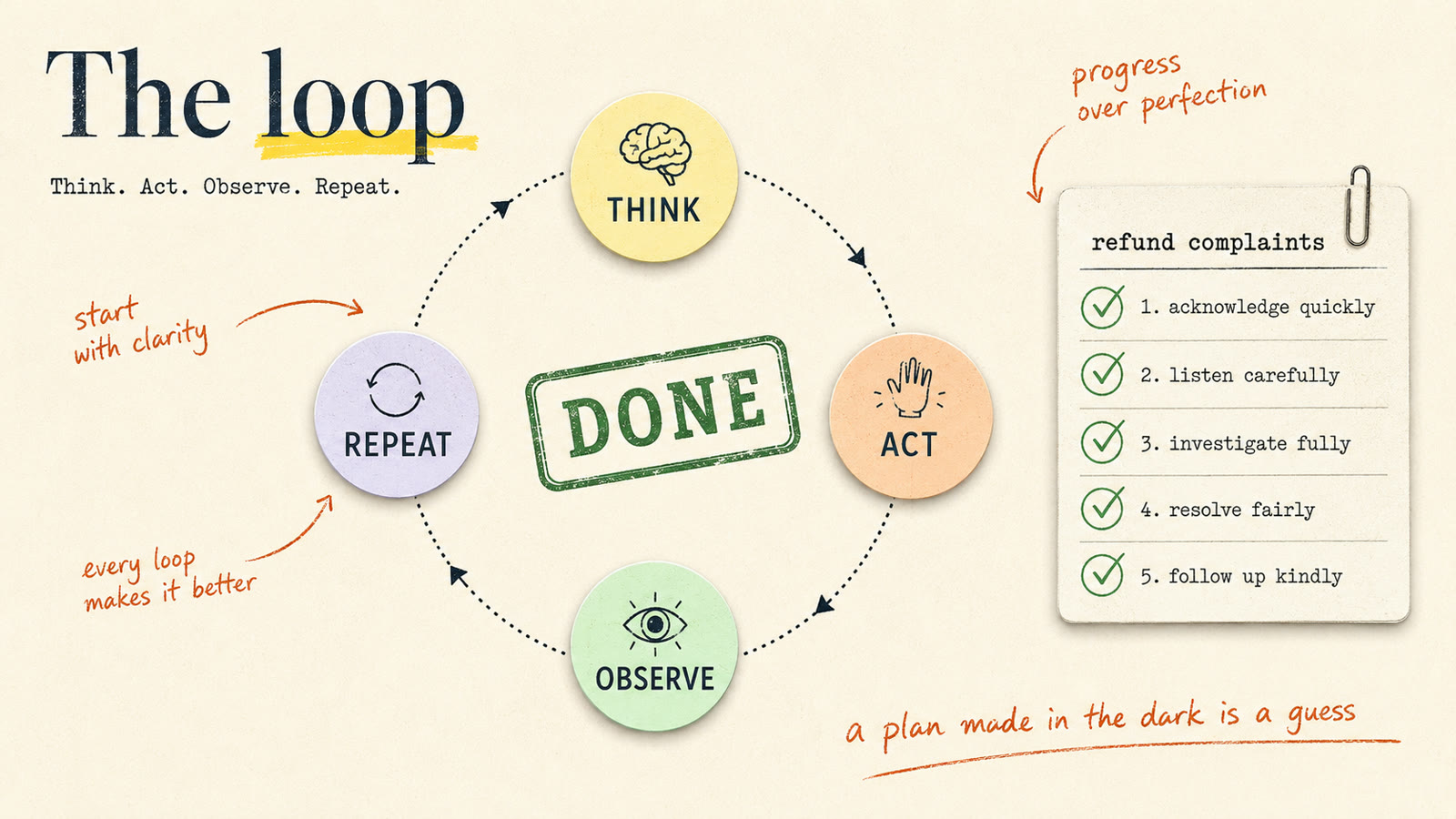
Watch it run. You say: handle the refund complaints. Think: I need the complaints. Act: read the list. Observe: thirty complaints, eight never refunded. It loops through those eight (refund, follow-up email, check, next), then checks the list once more and reports done. It never planned all of that up front; it didn't know there were eight until it looked. A plan made in the dark is a guess. The loop trades the guess for facts.
The genuinely hard part: when does the loop stop? Two opposite failure modes. Stop too early: one refund, "basically done," quits, and now you have to check its work anyway. Never stop: it refunds the same angry customer four times, or spins all night like a robot vacuum stuck in a corner. A runaway loop is a real bill; people have woken up to a four-figure charge for a job that never needed it.
A good loop has three exits: the task is genuinely finished, a hard cap on iterations so even confused it can't run forever, and the smart one, stopping to ask you when it's not sure. A refund for ten times the normal amount doesn't get guessed at. A loop that knows when to ask for help is worth more than one that's confident and wrong.
Tools and MCP: how the brain gets hands
Act means call a tool, and this is where the brain gets hands. Except the model still doesn't do anything; all it can produce is text. When it wants to act, it writes a very specific note: "call this tool, with these inputs." The harness reads the note, runs the actual function, and drops the result back into the window. Picture a manager who isn't allowed to touch the keyboard, handing sticky notes to an assistant. The model decides. The harness acts.
Tools mostly do four things: read, write, fetch, update. Real work chains them. "Where's my order?" becomes read the customer record, fetch the last order, update the status, write the confirmation. Four tools, one job.
Now the mess. Every tool has to be wired in, and for a long time every wiring job was custom. Ten tools, five agents that need them: fifty separate integrations, each written by a different person on a different Tuesday, each quietly breaking when something changes on the other end.
That's what MCP, the Model Context Protocol, solves: an open standard for plugging tools into agents. Build a tool once, speak the protocol, and any agent can use it. Think USB-C. Every device used to have its own weird charger; one port fixed it. The math is the real story: before, tools times agents, fifty connections. After, tools plus agents, fifteen. That collapse is why an ecosystem forms: an accounting app ships one MCP adapter and every agent everywhere can post payments. (One line on the sister standard: MCP is agent-to-tool; A2A is agent-to-agent.)
Tools are also where this gets dangerous. A tool doesn't think about sending the email. It sends it. Which raises a question that should make you slightly nervous.
Want to see this with real business apps? Here's how to connect Claude to your sales and marketing tools: HubSpot, Gmail, Canva and Slack, with safe tool permissions.
Hooks: the bouncer at the door
What stops the agent from running the wrong tool right now? The model's good judgment. That's it. The same probabilistic model that, depending on how you worded the prompt, might decide today is the day to run the cleanup command on the wrong folder. You don't ask a probabilistic thing to please be careful. You want a rule that runs every time, in code, that the model cannot talk its way out of. That's a hook: deterministic code that fires automatically at a fixed point in the loop. Before a tool runs. After a tool runs. When the agent says it's done. The model is the crowd; the hook is the bouncer, checking everyone, every time, no exceptions. The crowd can be charming all it wants. The bouncer doesn't care.
Job one is guardrails. A before-tool hook sees the agent about to read the file with your passwords in it and blocks it cold. And the one that matters most: when the agent declares it's finished, a hook runs the checks, sees failures, and says no, you're not done, go back. A hook doesn't just block the bad thing; it can refuse the stop and force the agent back into the loop. Enforcement, not a polite request. I wrote a full breakdown of hooks if you want the practical setup.
Job two makes memory real: hooks write to the cabinet. Fire one at the end of a conversation and it distills the messy transcript and writes the durable stuff into long-term memory: the new fact ("they always want the short version"), the approach that worked, the mistake written down so it isn't repeated. Next conversation, the agent walks in already knowing it. It got better while you were asleep, because it's a rule and not a mood.
Two things keep this from being a toy. Don't consolidate after every message; most messages are "thanks" and "got it," and storing everything isn't memory, it's clutter. Gate it. And don't use your expensive model for the summarizing; that's intern work. The senior brain answers the real questions, the intern writes up the notes.
The full memory system, in one frame
Put every arrow on the table at once.
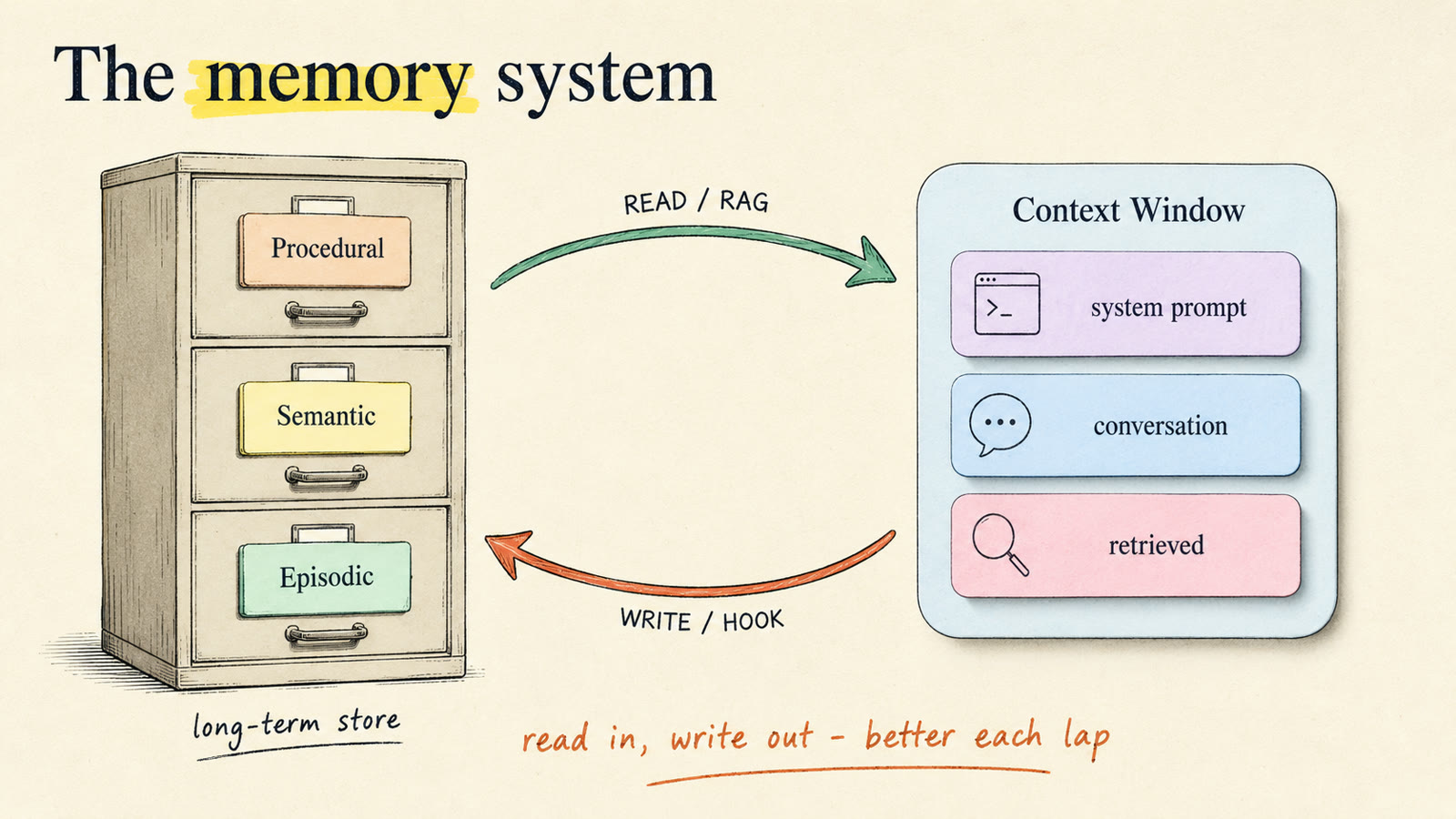
Working memory is the window: RAM, wiped every turn. Long-term memory is the cabinet outside: procedural, semantic, episodic. Two arrows connect them. The read path is RAG: a request comes in, only the few most relevant pieces enter the window. The write path is hooks: the run finishes, a hook distills what happened and files it back. The customer mentions a nut allergy, it gets filed, and three weeks later the agent already knows. Nobody had to tell it twice.
The version people build by accident dumps everything into the window, and it breaks three ways: it costs more (you're re-sending a novel each time someone says hello), it's slower, and it rots. Good memory is selective in both directions. Retrieve a little, on purpose. Write a little, on purpose, with a cheap model, on a gate. That's the difference between a system that gets sharper over time and a pile that gets slower and dumber.
Evals: grading the run
The system now remembers, acts, and writes itself back. Is it any good? You don't get to guess. You grade it.
Start with the boring part that saves you every time: keep the receipts. Every run, record what got retrieved, which tools fired with what inputs, how many tokens, how long. That's tracing. When something breaks, and it will, you don't squint at the final answer and theorize. You open the trace and see the exact step where it went sideways.
Then you grade two different things. Output eval: was the final answer correct? Did the dish taste right. Trajectory eval: was the path sound? Did the cook wash their hands, or did they just get lucky. An answer that looks right but skipped its checks is more dangerous than one that's obviously broken. The agent approves a $12 refund, the number's correct, the customer's happy, but it never checked the return window. This time the item qualified. Next week it approves a refund on something that was never eligible, looking just as confident. The field calls it corrupt success: right answer, wrong process.
Who grades? A second model can score runs, and that scales, but judges can be charmed by a confident-sounding answer. For anything with money or safety attached, write hard checks in plain code. Did the refund match the order total, yes or no. Code doesn't have a mood.
And set the bar at the eval, not the demo. Demos are easy: run the thing twenty times, show the one clean run. The eval grades all twenty. Then the flywheel: every failure the eval catches becomes a fix bolted onto the harness. Didn't know a rule? Add it to the system prompt. Ran something destructive? Add a hook. The system gets better not because you waited for a smarter model, but because you improved the harness, one caught failure at a time.
The full circle
Now watch one request take a full lap. You type: "follow up with the three customers who haven't paid this week." Before the model sees anything, the harness builds the working memory: system prompt, conversation summary, and the few relevant long-term memories about those exact customers. The packed window goes to the brain. The loop starts: think, act, observe, repeat. Tools reach out of the chat and into the world, and it keeps going until the job is done, not until it runs out of things to say.
You get an output, and here's what matters: things changed out in the world. Three emails that didn't exist an hour ago are sitting in three inboxes. That's the difference between a chatbot and an agent. One talks. One does. And the run still isn't over: a hook writes what it learned back to memory, and an eval grades the lap so the next one is a little better.
Look at the center of all that. The brain is maybe 10% of what you just watched, and it's the same brain everyone else can rent this afternoon. Everything else is the harness, and the harness is the part you build. The brain you rent. The harness you earn.
Where do you actually build one?
Good news, and it's bigger than you'd think: you don't build most of it. Real coding-agent tools already ship the circle. Take Claude Code, the one a lot of people already have open. The loop: built in. Context window management: built in. Tools, plus the USB-C port for more via MCP: built in. Hooks: built in. Skills with progressive disclosure: built in. Even subagents, handing a focused piece of work to a specialist: built in. You're not starting at zero. You're starting most of the way around the circle.
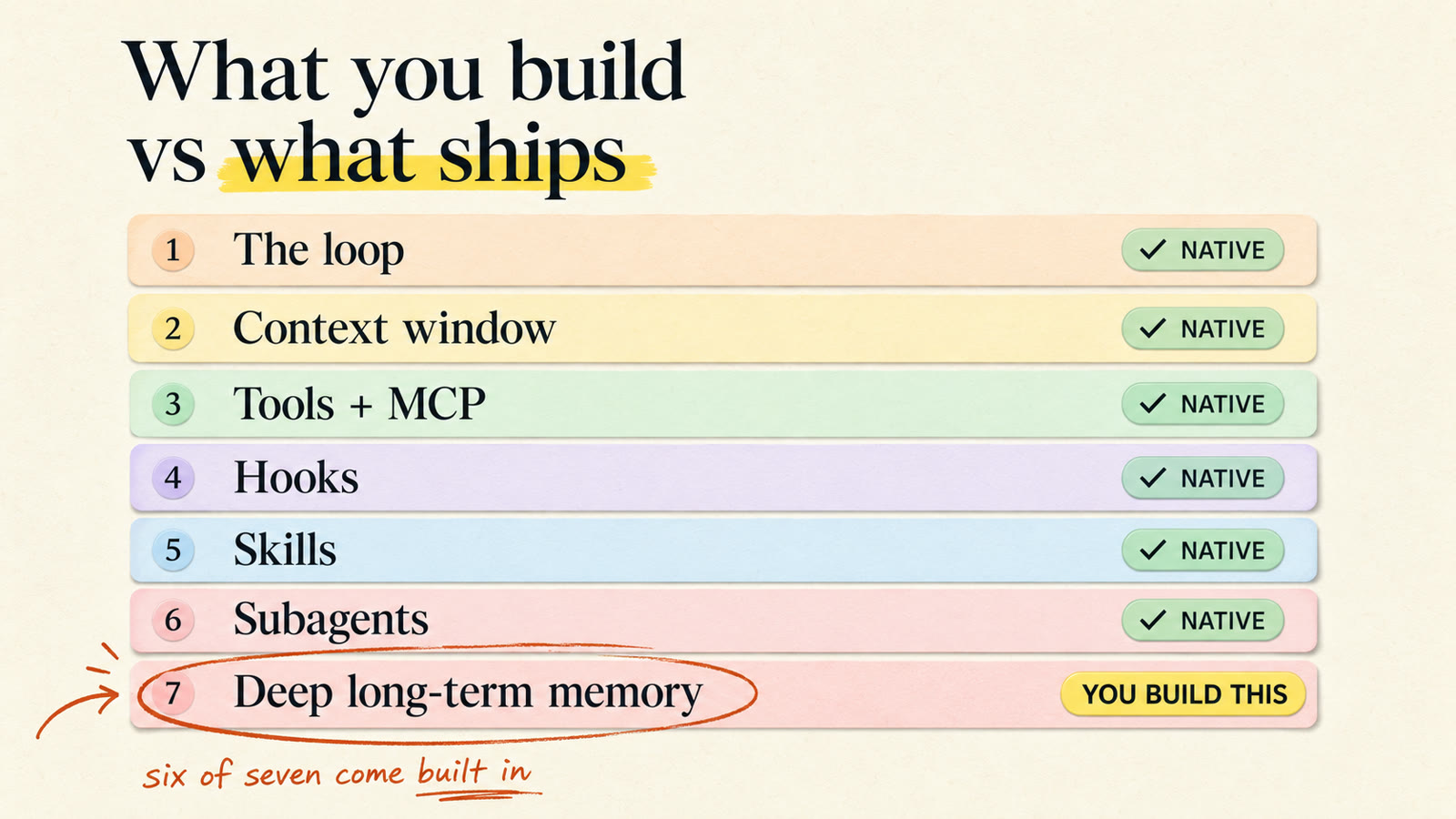
What's left is one thing: deep memory. Claude Code keeps lightweight memory files between sessions, and that's real. But the full long-term system, the one that learns your business across weeks and pulls back the three sentences that matter out of ten thousand documents, you wire up yourself. Honestly, that's the fun part: you skip the plumbing and build the piece that turns a sharp assistant into something that knows you. My second-brain guide is the practical starting point.
And once one agent works, you don't stop at one. You fan out: a manager agent splits a job, sends three workers to build three pieces in parallel, and hands the results to a fourth whose only job is review. Same shape as a real team, and the best version doesn't follow a script you wrote; the manager looks at the job and decides the plan in the moment. That's not a someday idea. That's today.
I teach this, start to finish
This post is the map. The training exists too. I have a full curriculum inside the community: seven courses, 181+ lessons, new drops every week. It starts at the foundations (LLMs, RAG, embeddings, tokens, the context window), moves through building automations and AI agents wired to your real tools, and includes Claude Code From Zero, a course that walks every block in this diagram, the loop, CLAUDE.md, memory, skills, MCP, hooks, and ends with a real pipeline you ship. See the full curriculum and judge it yourself.
If you just want free daily breakdowns, follow @pro.glitch on TikTok.
Either way, you can draw the circle now. Most people arguing about AI online still can't. Go build something.